




Table of Contents
[Hide]
- Understanding the Need for Wi-Fi in Remote Locations
- Mobile Hotspots: Your Best Friend
- Satellite Internet: A Reliable Alternative
- Finding Local Businesses with Free Wi-Fi
- Utilizing Community Resources
- Using Wi-Fi Finder Apps
- Carrying Portable Wi-Fi Routers
- Exploring Hotspot Plans with Your Carrier
- Leveraging Social Media for Wi-Fi Locations
- Preparing for Connectivity Challenges
- Understanding Data Security in Remote Areas
- Conclusion: Staying Connected Anywhere
Understanding the Need for Wi-Fi in Remote Locations
In today’s world, staying connected is essential. Many people require access to the internet for work, communication, and entertainment, even in remote locations. Whether you are an adventurous traveler, a digital nomad, or someone who enjoys exploring nature, finding Wi-Fi can be a challenge. It is important to understand the different reasons why you might need Wi-Fi away from urban centers. This section will explore various scenarios where internet access becomes important.
Key Takeaways & Quick Overview
- Use mobile hotspots for reliable internet access in remote areas.
- Explore satellite internet options for consistent connectivity.
- Leverage local businesses and community resources for Wi-Fi access.
Firstly, for professionals working remotely, having reliable internet can make or break productivity. Imagine being on a beautiful mountain top but unable to attend a important video conference. Secondly, travelers often rely on the internet for navigation and finding local attractions. Thirdly, many people want to share their experiences on social media instantly. All these factors highlight the growing importance of finding Wi-Fi in remote locations.
With the right tools and strategies, you can enhance your chances of finding a stable internet connection, even when you are far from the nearest coffee shop. This guide will provide you with practical tips and insights into how you can access Wi-Fi in areas where it seems scarce.
Mobile Hotspots: Your Best Friend
Mobile hotspots are portable devices that allow you to connect to the internet using cellular data. They can be a lifesaver when seeking Wi-Fi in remote locations. In 2026, many mobile service providers offer affordable plans that include mobile hotspots. This means you can stay connected almost anywhere as long as you have a good cellular signal.
To use a mobile hotspot effectively, first, make sure you have a data plan that supports it. Many smartphones also have hotspot features that allow you to share your data connection with other devices. This is particularly useful if you are traveling with friends or family. Check your device settings to turn on the hotspot feature and share your internet connection.
When exploring remote areas, remember to monitor your data usage. Streaming videos or downloading large files can quickly use up your data allowance. You can also check coverage maps provided by your cellular provider to determine where you are most likely to get a strong signal.
Satellite Internet: A Reliable Alternative
For those who frequently venture into very remote areas, satellite internet can be an excellent option. Unlike traditional internet services, satellite connectivity does not rely on local infrastructure. Instead, it uses satellites in orbit to provide internet access. This means you can access the internet even in the most secluded locations.
In 2026, several companies offer portable satellite internet devices that can easily fit into your backpack. These devices come equipped with satellite dishes that connect you to the internet. However, it is essential to note that satellite internet may have higher latency compared to traditional broadband services. This can affect activities like video conferencing and online gaming.
Before investing in satellite internet, research the available options to find one that suits your needs and budget. Some popular providers include Starlink and HughesNet. Look for user reviews to understand their reliability in different locations.
Finding Local Businesses with Free Wi-Fi
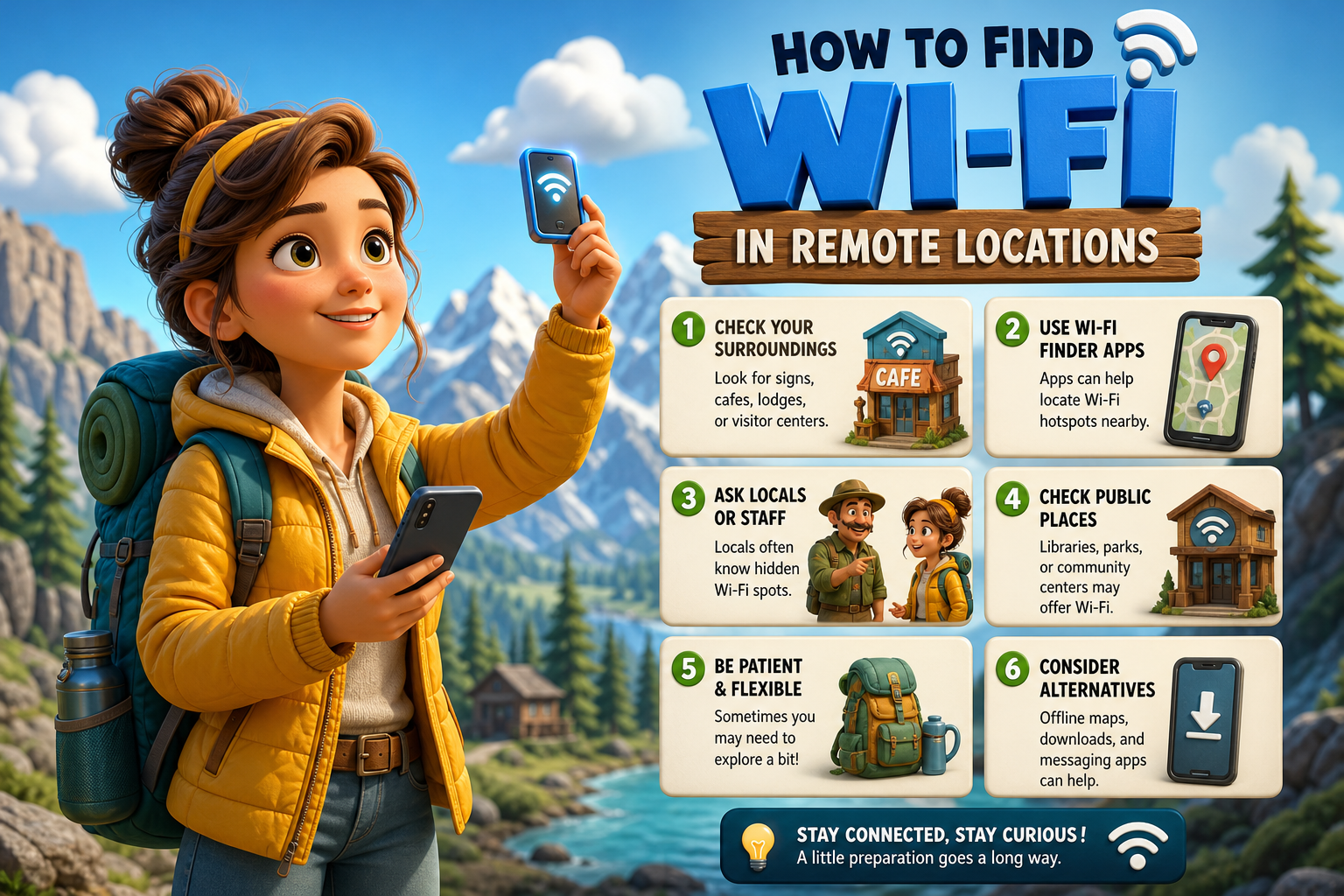
Many local businesses offer free Wi-Fi to customers. This can be a great way to access the internet while enjoying a coffee or snack. Cafes, restaurants, and libraries are common places where you can find free Wi-Fi. In more remote areas, look for community centers or local shops that might provide internet access.
To find these locations, use apps or websites that list businesses with free Wi-Fi. Apps like Wi-Fi Map or Wiman can help you discover hotspots nearby. Simply enter your location, and these tools will show the closest options. It is also beneficial to ask locals for recommendations. They often know the best spots to connect to the internet.
While using public Wi-Fi, it is essential to stay safe. Consider using a virtual private network (VPN) to protect your data from potential hackers. This is especially important when accessing sensitive information like banking details.
Recommended Pro-Tip
Always carry a portable charger to keep your devices powered up while searching for Wi-Fi in remote areas.
Utilizing Community Resources
Many communities are aware of the need for internet access, especially in rural or remote areas. Community centers, schools, and parks may offer free Wi-Fi to residents and visitors. These resources can be invaluable when you need to connect.
To utilize these resources, start by checking community bulletin boards or local government websites. They often provide information about available Wi-Fi resources in the area. Additionally, some local governments are working to expand internet access through public initiatives. Engaging with community groups on social media can also help you stay informed about Wi-Fi availability.
Don’t hesitate to reach out to the local library as well. Many libraries provide free Wi-Fi and may even have designated areas for remote work. This can be a quiet and comfortable place to connect when you are in town.
Using Wi-Fi Finder Apps
In the modern age, technology offers many solutions to find Wi-Fi. Wi-Fi finder apps are among the most useful tools for those looking to connect in remote locations. These apps can help you locate nearby Wi-Fi hotspots quickly.
Popular apps like Wi-Fi Finder and OpenSignal can help you discover free Wi-Fi networks in your vicinity. They typically provide user-generated information about the quality and reliability of each hotspot. This is particularly useful in areas where internet service may be limited. Before your trip, download these apps and familiarize yourself with their features.
When using these apps, check for recent reviews. This can give you insights into the current status of the Wi-Fi network. Some apps also allow you to download maps for offline use, which is helpful when traveling to areas with limited or no cellular coverage.
Carrying Portable Wi-Fi Routers
Another option for accessing Wi-Fi in remote locations is a portable Wi-Fi router. These devices create a local network that allows multiple devices to connect to the internet, usually via a mobile data connection. In 2026, many portable routers are available that are compact and easy to carry.
When using a portable router, ensure it is compatible with your mobile network provider. After setting up the router, you can connect your phone, tablet, or laptop. This is especially useful when traveling with a group, as everyone can share the same internet connection.
Some portable routers come with built-in power banks, which can charge your devices while providing internet access. This feature can be incredibly beneficial during long trips where power sources are limited. Always check the battery life of your portable router before heading out.
Exploring Hotspot Plans with Your Carrier
Many mobile carriers offer hotspot plans that allow you to share your phone’s data connection with other devices. This can be a cost-effective way to ensure you have internet access in remote areas. In 2026, most carriers provide various plans tailored to different usage levels.
Before choosing a plan, assess your internet needs. If you only need occasional access, a pay-as-you-go option might be suitable. However, if you frequently travel to remote locations, consider a monthly plan that offers generous data allowances. Be sure to read the fine print regarding data throttling, as some carriers may slow down your connection after a certain limit is reached.
Additionally, inquire about family plans or bundled services. These options can save money if multiple users need access. Always check online for promotions or discounts that your carrier may offer.
Leveraging Social Media for Wi-Fi Locations
Social media can be a powerful tool for finding Wi-Fi in remote locations. Many businesses advertise their free Wi-Fi services on platforms like Facebook and Instagram. By searching hashtags related to your location, you can discover spots that may not be listed on traditional maps.
Join local groups on social media to ask for recommendations directly. Many residents are happy to share their favorite spots for internet access. Additionally, some travel forums and blogs provide updated information on Wi-Fi availability in various regions.
When using social media, always be cautious about privacy settings. Ensure that you do not share sensitive information publicly. You can also follow local tourism pages that often highlight businesses offering free Wi-Fi to visitors.
Preparing for Connectivity Challenges
When traveling to remote locations, it is essential to prepare for potential connectivity challenges. Internet access may not always be reliable, and having a plan can save you frustration. Before your trip, identify your essential online tasks and prioritize them.
For instance, if you need to send important emails, try to complete that task in the first few days of your trip. This way, if you encounter connectivity issues later, you will have already taken care of your most critical needs. Downloading documents and files for offline use can also help you work even without internet access.
Additionally, always have backup options ready. A combination of mobile data, portable routers, and public Wi-Fi can provide a safety net. Carrying a power bank is also a wise choice, as staying charged is important when searching for internet access in remote areas.
Understanding Data Security in Remote Areas
When using public Wi-Fi, especially in remote locations, it is vital to prioritize your data security. Public networks can be vulnerable to hackers looking to steal personal information. To protect yourself, consider using a VPN. A VPN encrypts your internet connection, making it more secure.
Before connecting to any public Wi-Fi, ensure that your device’s firewall is enabled and that your software is up to date. This can help block unauthorized access to your data. Avoid logging into sensitive accounts, such as online banking, when using public networks.
Additionally, always log out of accounts after use and avoid auto-connecting to Wi-Fi networks. This habit can help prevent your device from connecting to potentially unsafe networks without your knowledge.
Conclusion: Staying Connected Anywhere
Finding Wi-Fi in remote locations is possible with the right tools and strategies. As we have explored, mobile hotspots, satellite internet, and public Wi-Fi are just a few options to consider. Understanding the resources available in your chosen area can greatly enhance your connectivity experience.
Remember to prepare for challenges by having backup options and prioritizing your online tasks. Engaging with local communities and utilizing technology can help you stay connected, no matter where your adventures take you. By applying these tips, you can ensure that you remain linked to the digital world, even in the most secluded spots.
Embrace the journey, and do not let a lack of Wi-Fi hold you back from exploring the beauty of remote locations.